<?xml version="1.0" encoding="UTF-8"?>
<feed xmlns="http://www.w3.org/2005/Atom">
                        <id>https://simonkollross.de/feed</id>
                                <link href="https://simonkollross.de/feed"></link>
                                <title><![CDATA[Simon Kollross]]></title>
                                <updated>2020-07-16T03:52:56+00:00</updated>
                        <entry>
            <title><![CDATA[Encrypting Laravel Eloquent attributes using a custom cast]]></title>
            <link rel="alternate" href="https://simonkollross.de/posts/encrypting-laravel-eloquent-attributes-using-a-custom-cast" />
            <id>https://simonkollross.de/15</id>
            <author>
                <name> <![CDATA[Simon Kollross]]></name>
            </author>
            <summary type="html">
                <![CDATA[<p>Recently I came across the issue that I wanted to encrypt some Eloquent attributes at-rest before storing them in a database. Encrypting attributes with <a href="https://laravel.com/docs/master/encryption">Laravel's encryption features</a> is especially useful if your app uses a separate database server. If you encrypt attribute values with the app server's <code>APP_KEY</code>, only the app server itself can read those values. In case anyone gets access to your database, only the ciphertext is exposed which is obviously useless without having access to the <code>APP_KEY</code> for decryption. Laravel uses strong state-of-the-art AES-256 encryption by default. Your data really is safe.</p>
<p>To make use of Laravel's built-in encryption features, make sure you have the <code>APP_KEY</code> variable set in your <code>.env</code> file. Since Laravel 7, Eloquent has support for custom casts. Using custom casts we can easily encapsulate transparent attribute encryption and decryption in an <code>EncryptCast</code> class.</p>
<pre><code class="language-php">&lt;?php

namespace App\Casts;

use Illuminate\Contracts\Database\Eloquent\CastsAttributes;

class EncryptCast implements CastsAttributes
{
    public function get($model, string $key, $value, array $attributes)
    {
        return ! is_null($value) ? decrypt($value) : null;
    }

    public function set($model, string $key, $value, array $attributes)
    {
        return [$key =&gt; ! is_null($value) ? encrypt($value) : null];
    }
}</code></pre>
<p>Let me show you how to use this cast. Suppose there is a <code>User</code> model and we want to encrypt the user's age.</p>
<pre><code class="language-php">&lt;?php

namespace App;

use App\Casts\EncryptCast;
use Illuminate\Database\Eloquent\Model;

class User extends Model
{
    protected $casts = [
        'age' =&gt; EncryptCast::class,
    ];

    // ...
}</code></pre>
<p>When we set the user's age somewhere in our application code, the attribute is encrypted. If we access <code>$user-&gt;age</code>, the attribute is decrypted. Everything happens automatically behind the scenes.</p>
<p>But there are some things you have to be aware of.</p>
<p><strong>Don't expose the app key.</strong>
Everyone with access to the <code>APP_KEY</code> can read the encrypted attributes.</p>
<p><strong>Don't loose the app key.</strong>
Make sure you backup the <code>APP_KEY</code> in a secure location. You cannot restore the data without the key because that's the reason why you're encrypting data.</p>
<p><strong>Don't change the app key.</strong>
Although regular key rotation might be a good idea to prevent e.g. former employees from gaining access to data, make sure to implement a migration which decrypts the data using the old key and encrypts it again using the new key before changing the <code>APP_KEY</code>.</p>
<p><strong>Make sure database columns have a proper type.</strong>
When encrypting existing values in your database, create a migration that changes the column type to something like <code>text</code>. The final length of the ciphertext is hardly predictable and probably longer than the plaintext. If the database silently cuts off some characters from the ciphertext, it cannot be decrypted and the data is lost.</p>
<p><strong>Use a migration to encrypt existing values.</strong>
Encrypt existing attribute values that will use the <code>EncryptCast</code> in a migration, so the values can be read after the code has been deployed. Take care, Laravels <code>encrypt</code> function also encrypts <code>NULL</code> values. If <code>NULL</code> values should stay <code>NULL</code>, you have to handle that case in your migration. This also reflects the behavior of the <code>EncryptCast</code> shown above.</p>
<p>I hope you've learnt something from this post. If you're interested in IT security and data protection, follow <a href="https://twitter.com/skollro">@skollro</a> on Twitter or subscribe to my newsletter. I also hope to resume the work on my eBook <a href="https://gdprfordevelopers.com">GDPR for Developers</a> soon, where I try to learn you some techniques on how to make Laravel applications more secure.</p>]]>
            </summary>
            <updated>2020-07-16T03:52:56+00:00</updated>
        </entry>
            <entry>
            <title><![CDATA[Installing Imagick for PHP using Homebrew]]></title>
            <link rel="alternate" href="https://simonkollross.de/posts/installing-imagick-for-php-using-homebrew" />
            <id>https://simonkollross.de/14</id>
            <author>
                <name> <![CDATA[Simon Kollross]]></name>
            </author>
            <summary type="html">
                <![CDATA[<p>Some weeks ago I have completely reinstalled macOS on my MacBook Pro. Today, while working on one of my projects, I realized that I forgot to reinstall the Imagick PHP extension.</p>
<p>Since <code>brew</code> is not used as default package manager for PHP on Mac anymore, you have to use <code>pecl</code> to install additional PHP extensions.</p>
<p>Installing Imagick for PHP 7.3 on a Mac is actually quite simple.</p>
<pre><code class="language-bash">brew install php
brew install imagemagick
pecl install imagick</code></pre>
<p>I have to look it up everytime I need to install it, so I thought I just share it with you to save you some time.</p>]]>
            </summary>
            <updated>2019-07-15T06:53:49+00:00</updated>
        </entry>
            <entry>
            <title><![CDATA[Logging a Forge server to Papertrail with encryption in transit]]></title>
            <link rel="alternate" href="https://simonkollross.de/posts/logging-a-forge-server-to-papertrail-with-encryption-in-transit" />
            <id>https://simonkollross.de/13</id>
            <author>
                <name> <![CDATA[Simon Kollross]]></name>
            </author>
            <summary type="html">
                <![CDATA[<p>Recently I had to setup a central logging system for an application deployed with Laravel Forge. I decided to use <a href="https://papertrailapp.com/">Papertrail</a>, since you can setup it using Forge. I've found a tutorial by <a href="https://mattstauffer.com/blog/laravel-forge-logging-with-papertrail/">Matt Stauffer</a>, which helped me to get the ball rolling.</p>
<p>The only thing that bothered me was that logs transferred to Papertrail use UDP by default. As UDP is a stateless &quot;fire-and-forget&quot; transfer protocol, there's no security in place by default. This is good for performance, but a major drawback for mission critical applications, where you have to protect  data as well as logs.</p>
<p>Transferring log data without encryption in transit means everyone can have a look at what's going on in your application and gains a certain amount of insight into your app. Just by looking at the contents of transferred log entries someone could collect information about usage patterns of your application, even if your log messages do not contain sensitive information.</p>
<p>This is especially a problem if you use an external service for logging like Papertrail, which is located outside your private network and therefore outside of your control. Keep in mind that <strong>logs should be kept free of personal identifiable information</strong> anyways. Remember to think about strategies to pseudonymize and anonymize sensitive data in logs ahead of time.</p>
<p>Luckily, you can encrypt your logs in transit using TCP and TLS, which is a bit slower than sending via UDP but worth the effort in terms of additional security.</p>
<h2>Installing Papertrail on a Laravel Forge Server</h2>
<p>Let me show you the basic steps on how to configure logging with Papertrail. Make sure that basic logging works before you add encryption to the stack. It might take a couple of minutes until generated log messages show up in Papertrail.</p>
<ol>
<li>Sign up for a <a href="https://papertrailapp.com/signup">Papertrail Account</a></li>
<li>Go to &quot;Settings &gt; Log Destinations&quot; and copy your log destintation's URL, e.g. <code>logN.papertrailapp.com:XXXXX</code></li>
<li>Use Forge to install Papertrail on the &quot;Monitoring&quot; page of your server by specifying your log destination's URL</li>
<li>Head over to Papertrail and check if logging works, e.g. <code>logger "test"</code></li>
</ol>
<h2>Encrypt log messages in transit</h2>
<p>After you've got basic logging working, you can enable TLS-encryption in transit for log messages transferred to Papertrail. <code>rsyslog</code> is installed on Laravel Forge provisioned servers by default.</p>
<ol>
<li>Run <code>sudo curl -o /etc/papertrail-bundle.pem https://papertrailapp.com/tools/papertrail-bundle.pem</code> to download Papertrail's CA to your server</li>
<li>Run <code>sudo apt install rsyslog-gnutls</code> to install the TLS extension for <code>rsyslog</code></li>
<li>Open <code>/etc/rsyslog.d/20-papertrail.conf</code> and replace its contents with the configuration provided below, keep in mind to update the last line with your log destination's URL <code>*.* @@logsN.papertrailapp.com:XXXXX</code>
<pre><code>$DefaultNetstreamDriverCAFile /etc/papertrail-bundle.pem # trust these CAs
$ActionSendStreamDriver gtls # use gtls netstream driver
$ActionSendStreamDriverMode 1 # require TLS
$ActionSendStreamDriverAuthMode x509/name # authenticate by hostname
$ActionSendStreamDriverPermittedPeer *.papertrailapp.com
*.* @@logsN.papertrailapp.com:XXXXX</code></pre></li>
<li>Run <code>sudo service rsyslog restart</code></li>
<li>Head over to Papertrail and check if logging still works</li>
<li>Uncheck &quot;Accept connections via UDP (Plain text)&quot; in &quot;Settings &gt; Log Destinations &gt; Destination Settings&quot; and &quot;Accept logs from unrecognized systems?&quot; as soon as you have configured every system that should log to your destination.</li>
<li>Test again</li>
</ol>
<p>Papertrail recommends some tweaks to your configuration to queue log messages if the TLS connection drops in between, <a href="https://help.papertrailapp.com/kb/configuration/advanced-unix-logging-tips#tweak-queue-options-for-connection-failure">check out their help page to find out more</a>. If logging is not working, use <code>sudo tcpdump -n -s 1500 -X port XXXXX</code> to monitor your network transfer. A new entry should be generated everytime you send a message using <code>logger "test"</code>.</p>
<p>I hope you've enjoyed this post on your journey towards more data protection. Tell me what you think, <a href="https://twitter.com/skollro">I'm @skollro on Twitter</a>. If you're interested in data protection, check out my eBook <a href="https://gdprfordevelopers.com">GDPR for Developers</a>.</p>]]>
            </summary>
            <updated>2019-07-09T08:42:35+00:00</updated>
        </entry>
            <entry>
            <title><![CDATA[Creating encrypted backups of Laravel apps]]></title>
            <link rel="alternate" href="https://simonkollross.de/posts/creating-encrypted-backups-of-laravel-apps" />
            <id>https://simonkollross.de/12</id>
            <author>
                <name> <![CDATA[Simon Kollross]]></name>
            </author>
            <summary type="html">
                <![CDATA[<p>Backup security is important, especially if you're processing sensitive data. Nobody except you should be able to read your application's backups and you should be confident that you don't loose any data in case of trouble.</p>
<p>You should always encrypt backups of your apps and securely transfer them to one or multiple backup destinations. If you encrypt the backups on your server and transfer only the encrypted version, your backups are stored encrypted at rest in your backup destination. Not even your backup storage provider is able to read them.</p>
<p>I recommend you to choose another storage provider for backups than the infrastructure provider of your production systems. If there are problems with your provider for whatever reason, you're still able to access your backups to recover as fast as possible.</p>
<h2>Introducing spatie/laravel-backup</h2>
<p>Spatie's <a href="https://github.com/spatie/laravel-backup">laravel-backup</a> package is the perfect starting point for implementing a backup strategy for your app. It creates a snapshot of your database and your app's files and puts them into a ZIP file, which is transferred to specified backup locations. The package is fully configurable, just customize its settings to your needs and make use of Laravel's scheduler to create backups regularly. You can read more about how to setup Spatie's package <a href="https://docs.spatie.be/laravel-backup/v6/introduction/">in the docs</a>.</p>
<h2>Encrypt your backups using AES-256</h2>
<p>There is one thing the backup package is missing: Encryption. Since the package is firing various events where we can listen to, adding encryption is really easy. The event we're interested in is <code>BackupZipWasCreated</code>. It is fired as soon as the ZIP file containing the database dumps and files has been created and before it is copied over to the backup destinations. As a result of this, it's the perfect place to perform last minute operations such as encryption on the backup file.</p>
<p>If you're dealing with sensitive files, you should use a secure cipher to encrypt your backup, such as AES-256. Luckily, PHP 7.2 has native support for encryption built into <code>ZipArchive</code>.</p>
<p>Let's create a listener for the <code>BackupZipWasCreated</code> event that encrypts the backup, called <code>EncryptBackupZip</code>.</p>
<pre><code class="language-php">&lt;?php

namespace App\Listeners;

use ZipArchive;
use Illuminate\Support\Collection;
use Spatie\Backup\Events\BackupZipWasCreated;

class EncryptBackupZip
{
    public function handle(BackupZipWasCreated $event)
    {
        $zip = new ZipArchive;
        $zip-&gt;open($event-&gt;pathToZip);
        $zip-&gt;setPassword(config('app.backup.password'));

        Collection::times($zip-&gt;numFiles, function ($i) use ($zip) {
            $zip-&gt;setEncryptionIndex($i - 1, ZipArchive::EM_AES_256);
        });

        $zip-&gt;close();
    }
}
</code></pre>
<p>As of Laravel 5.8.9, you can use <a href="https://laravel.com/docs/master/events#event-discovery">Event Discovery</a>, so you don't have to register the listener manually in the <code>EventServiceProvider</code>. Just typehint the event the listener should listen for and Laravel wires everything together.</p>
<p>I have externalized the password for the backup ZIP files in an <code>.env</code> variable, which is made available through <code>config('app.backup.password')</code>. Your password is not used for encryption directly. It is passed to a key derivation function that generates a key of 32 bytes required for AES-256 encryption. Only take care you add enough entropy to the password.</p>
<p>As we have everything in place now, we can run <code>php artisan backup:run</code>. To verify encryption is working properly, try to open a backup file, e.g. using <a href="https://theunarchiver.com/">The Unarchiver</a>, and you will be prompted to enter the password before you get access.</p>
<p>Take care to note your backup password and keep it secure. <strong>If you loose your password, your backups can not be decrypted anymore and your data is lost forever!</strong></p>
<p>I hope you had fun reading this post. Data protection isn't as much effort as it seems to be, but take it seriously and start small. Tell me what you think, I'm <a href="https://twitter.com/skollro">@skollro on Twitter</a>.</p>
<h2>Update (03/07/2019): &quot;GDPR for Developers&quot;</h2>
<p>If you liked this post and you're interested in data protection, check out what I'm working on next! <a href="https://gdprfordevelopers.com">GDPR for Developers</a> is a short eBook I'm writing. I'm putting together a guide containing actionable advice for developers for implementing more data protection in their apps. I'm sure you'll love it!</p>]]>
            </summary>
            <updated>2019-07-03T13:53:45+00:00</updated>
        </entry>
            <entry>
            <title><![CDATA[Implementing cursor-based pagination in Laravel]]></title>
            <link rel="alternate" href="https://simonkollross.de/posts/implementing-cursor-based-pagination-in-laravel" />
            <id>https://simonkollross.de/11</id>
            <author>
                <name> <![CDATA[Simon Kollross]]></name>
            </author>
            <summary type="html">
                <![CDATA[<p>In this post I will show you how to implement cursor-based pagination for Laravel applications using Eloquent.</p>
<p>In a typical web application that uses a database you might have more records than you can fit on a page or in a single result set from a query. To retrieve more data, there are basically two options: Offset-based and cursor-based pagination.</p>
<h2>Offset-based pagination</h2>
<p>Offset pagination is the most common form of pagination, e.g. for blog posts. You see a list of records and on the bottom there is a pagination bar you can use to navigate to a specific part of the dataset by clicking on a page number. Offset-based pagination uses a <code>LIMIT</code> and an <code>OFFSET</code> clause to control the records to load.</p>
<p><code>OFFSET</code> is the number of records to skip before a specified and limited amount of rows is retrieved thereafter. Implementing offset-based pagination for Eloquent results in Laravel is pretty easy, <a href="https://laravel.com/docs/5.8/pagination#paginating-eloquent-results">as there is an official integration you can check out in the docs</a>.</p>
<h2>Cursor-based pagination</h2>
<p>Sometimes, offset pagination leads to problems. One of them is performance. If the <code>OFFSET</code> gets really large, the database has to scan through lots of records just to find the right starting point for retrieving a relatively small amount of rows for the next page.</p>
<p>If you are dealing with data that is likely to change, another problem occurs. It may happen that offset pagination yields partially the same results multiple times and you have to deal with the duplication in application code, which sometimes is not obvious.</p>
<p>This is where cursor pagination comes into play. A cursor is a unique identifier for a specific record, from where further querying has to start to get the next page of results. Cursor pagination on the backend is the perfect counterpart to an infinite scrollable list of results on the frontend and makes its implementation really easy.</p>
<p>The idea of cursor pagination is that there is a clear unique order on the dataset. As a result of this, we can remove records we don't want to have in our results using a <code>WHERE</code> clause. This is very efficient, since our database can use indexes in this case. Additionally, we use <code>LIMIT</code> to restrict the amount of results per page and calculate the next cursor from the last result row, which is passed in on the next query as a starting point to get further results.</p>
<h2>Cursor-based pagination with Eloquent</h2>
<p>So let's see how to implement cursor based pagination with Laravel's ORM Eloquent. Most of this code will be living in a <code>cursorPaginate($limit, $columns)</code> macro on the <code>Illuminate\Database\Eloquent\Builder</code> at the end of the day, so I just pick out and explain the most interesting parts before I provide the full source code. <code>$this</code> always references to the instance of the <code>Builder</code> in the following code snippets.</p>
<p>First, we get the current cursor from the URL by calling <code>$cursor = CursorPaginator::currentCursor();</code>. A cursor is basically just an array that contains all relevant column values that identify a row. The names of those columns are passed by the user as keys of the <code>$columns</code> array, but later more about that.</p>
<h3>Cursor-based pagination using multiple columns</h3>
<p>As I've said before, a clear unique order has to be defined on the dataset to prevent fetching the same results twice and to work with a stable cursor. Of course, an obvious choice would be the table's primary key, e.g. the <code>id</code> column. But what happens if you want to order the results based on the <code>created_at</code> column, a user-specified column, or even multiple columns with different sort directions? Or what if you can't just order by <code>id</code> to mimic ordering by <code>created_at</code> (which is an ugly hack anyways), because your primary keys are UUIDs that are not sequential? Stay tuned, I've got you covered.</p>
<p>The <code>created_at</code> column is obviously not guaranteed to be unique, since multiple records could be created at the same time, so we would miss results. Therefore, our cursor has to combine <code>created_at</code> and <strong>at least one truly unique column</strong> to clearly identify a specific record of our dataset, like <code>id</code>.</p>
<p>As a result of that, we have to use <code>created_at</code> and <code>id</code> for the <code>ORDER BY</code> clause of the query to get a stable order in addition to a <code>WHERE</code> clause, that removes all results before the values specified by the cursor, including the cursor's own values.</p>
<p>Let's have a look at the mathematical background to find out how to create this <code>WHERE</code> clause. We have to use tuple comparison to remove all tuples from the results that are less than or equals the cursor's value.</p>
<p>So let <code>a, b, c, d</code> be columns.  <code>(a, b)</code>, <code>(c, d)</code> represent rows of a table. <code>(a, b) &gt; (c, d)</code> is basically the same as <code>a &gt; c or (a = c and (b &gt; d))</code>. So let's expand this to use a third column: <code>(a, b, c) &gt; (d, e, f)</code> is basically the same as <code>a &gt; d or (a = d and (b &gt; e or (b = e and (c &gt; f))))</code>. You see the recursive pattern?</p>
<h3>A recursive <code>apply</code> function for tuple comparison</h3>
<p>We are not using tuple comparison in SQL directly (which would be possible), because basic tuple comparison is too inflexible for our use case. So we construct our <code>WHERE</code> clause using a recursive function. This allows us to specify different sort directions for different columns, e.g. <code>created_at</code> could be sorted descending and <code>id</code> could be sorted ascending at the same time, so we have the most flexibility.</p>
<pre><code class="language-php">$apply = function ($query, $columns, $cursor) use (&amp;$apply) {
    $query-&gt;where(function ($query) use ($columns, $cursor, $apply) {
        $column = key($columns);
        $direction = array_shift($columns);
        $value = array_shift($cursor);

        $query-&gt;where($column, $direction === 'asc' ? '&gt;' : '&lt;', $value);

        if (! empty($columns)) {
            $query-&gt;orWhere($column, $value);
            $apply($query, $columns, $cursor);
        }
    });
};

$apply($this, $columns, $cursor);</code></pre>
<p><code>$apply</code> basically takes an Eloquent <code>Query</code>, an array of columns that specify the sort order, e.g. <code>$columns = ['created_at' =&gt; 'desc', 'id' =&gt; 'asc']</code>, and an array containing the values  stored in the cursor, e.g. <code>['2019-06-22 17:01:14', 42]</code>, where the values contain the last <code>created_at</code> and <code>id</code> values of the previous query. Using this data as input, <code>apply</code> constructs the <code>WHERE</code> clause recursively based on the concepts of tuple comparison shown in the previous section.</p>
<h3>Get the results in the right order</h3>
<p>We have enforce a stable order for getting stable results. Therefore, we simply add an <code>ORDER BY</code> clause that appends the sort directions from the <code>$columns</code> array to the query.</p>
<pre><code class="language-php">foreach ($columns as $column =&gt; $direction) {
    $this-&gt;orderBy($column, $direction);
}</code></pre>
<h3>Limit the results and create the next cursor</h3>
<p>Finally, we append a <code>LIMIT</code> clause that is equals to the amount of records per page the user wants to retrieve.</p>
<p>But why the <code>$limit + 1</code>? That's a little trick  to find out if there is another page of results available. We fetch one row more than required, which is later removed from the results. So we know we have to create another cursor, because there is at least one more result available that lives on the next page.</p>
<pre><code class="language-php">$items = $this-&gt;limit($limit + 1)-&gt;get();

if ($items-&gt;count() &lt;= $limit) {
    return new CursorPaginator($items);
}

$items-&gt;pop();

return new CursorPaginator($items, array_map(function ($column) use ($items) {
    return $items-&gt;last()-&gt;{$column};
}, array_keys($columns)));</code></pre>
<p>If a next page is available, we create the next cursor by specifying the second argument for <code>CursorPaginator</code>, which is an array of the relevant values of the last row of the current results to include in the next cursor.</p>
<h3>The <code>CursorPaginator</code> helper class</h3>
<p>We are returning an instance of <code>CursorPaginator</code> to the class that calls our <code>cursorPaginate</code> macro, e.g. a controller. It makes working with cursors and results simpler, since it takes care of encoding the cursor properly for its use in URLs, and exposes the items to respond, the next cursor URL, as well as the current cursor. In addition, you can specify additional query string parameters that are appended to the next cursor URL using <code>appends</code>.</p>
<pre><code class="language-php">class CursorPaginator
{
    protected $items;
    protected $nextCursor;
    protected $params = [];

    public function __construct($items, $nextCursor = null)
    {
        $this-&gt;items = $items;
        $this-&gt;nextCursor = $nextCursor;
    }

    public static function currentCursor()
    {
        return json_decode(base64_decode(request('cursor')));
    }

    public function appends($params)
    {
        $this-&gt;params = $params;

        return $this;
    }

    public function items()
    {
        return $this-&gt;items;
    }

    public function nextCursorUrl()
    {
        return $this-&gt;nextCursor ? url()-&gt;current().'?'.http_build_query(array_merge([
            'cursor' =&gt; base64_encode(json_encode($this-&gt;nextCursor)),
        ], $this-&gt;params)) : null;
    }
}</code></pre>
<h3>Extend the Eloquent <code>Builder</code> with a <code>cursorPaginate</code> macro</h3>
<p>Let's put all this stuff together I've shown you before and create a <code>cursorPaginate</code> macro on the Eloquent <code>Builder</code>.</p>
<pre><code class="language-php">use Illuminate\Database\Eloquent\Builder;

Builder::macro('cursorPaginate', function ($limit, $columns) {
    $cursor = CursorPaginator::currentCursor();

    if ($cursor) {
        $apply = function ($query, $columns, $cursor) use (&amp;$apply) {
            $query-&gt;where(function ($query) use ($columns, $cursor, $apply) {
                $column = key($columns);
                $direction = array_shift($columns);
                $value = array_shift($cursor);

                $query-&gt;where($column, $direction === 'asc' ? '&gt;' : '&lt;', $value);

                if (! empty($columns)) {
                    $query-&gt;orWhere($column, $value);
                    $apply($query, $columns, $cursor);
                }
            });
        };

        $apply($this, $columns, $cursor);
    }

    foreach ($columns as $column =&gt; $direction) {
        $this-&gt;orderBy($column, $direction);
    }

    $items = $this-&gt;limit($limit + 1)-&gt;get();

    if ($items-&gt;count() &lt;= $limit) {
        return new CursorPaginator($items);
    }

    $items-&gt;pop();

    return new CursorPaginator($items, array_map(function ($column) use ($items) {
        return $items-&gt;last()-&gt;{$column};
    }, array_keys($columns)));
});</code></pre>
<h3>Example: Cursor pagination with a JSON API</h3>
<p>Finally, let me show you an example how to use our cursor paginator on a Laravel controller that manages a list of posts. This example should be pretty self-explanatory now. Of course you can use URL parameters to control limit and sort columns, just pass them to the macro and append them to the next cursor URL, that's up to you. But don't forget: A truly unique column has always to be specified so things don't break!</p>
<pre><code class="language-php">class PostsController
{
    public function index()
    {
        $paginator = Post::cursorPaginate(request('limit', 25), [
            'created_at' =&gt; 'desc',
            'id' =&gt; 'desc',
        ])-&gt;appends(request()-&gt;only('limit'));

        return [
            'data' =&gt; $paginator-&gt;items(),
            'links' =&gt; [
                'next' =&gt; $paginator-&gt;nextCursorUrl(),
            ],
        ];
    }
}</code></pre>
<h4>How does the generated SQL look like?</h4>
<pre><code class="language-sql">select *
from "posts"
where ("created_at" &lt; ? or "created_at" = ? and ("id" &lt; ?))
order by "purchased_at" desc, "id" desc
limit 26</code></pre>
<h2>Conclusion</h2>
<p>Huh, this post got a lot longer than I've expected. Congratulations if you did it until here! :)</p>
<p>I've shown a lot of code and concepts in this post, so I'm sure you have to copy it and play around with it to fully understand everything. And you should!</p>
<p>I'm sure my implementation is not perfect, but it is at least more flexible than most implementations out there. Especially, the ability to sort by multiple columns in multiple directions at the same time.</p>
<p>I hope you can use some ideas of this post in your next projects and I'd like to hear from you what you think about it. I'm <a href="https://twitter.com/skollro">@skollro on Twitter</a>.</p>]]>
            </summary>
            <updated>2019-06-22T17:15:18+00:00</updated>
        </entry>
            <entry>
            <title><![CDATA[Casing of acronyms in PHP and case-sensitive Git on macOS]]></title>
            <link rel="alternate" href="https://simonkollross.de/posts/casing-of-acronyms-in-php-and-case-sensitive-git-on-macos" />
            <id>https://simonkollross.de/10</id>
            <author>
                <name> <![CDATA[Simon Kollross]]></name>
            </author>
            <summary type="html">
                <![CDATA[<p>Some weeks ago I started a <a href="https://twitter.com/skollro/status/1092147968696827905">Twitter survey</a> to find out how PHP developers handle capitalization of acronyms in class names. 60 % of the participants voted for using strict camelCase in class names to avoid messy names like <code>RESTAPIService</code>.</p>
<p>As a result of this, I wanted to apply this convention to my own projects. So I had to rename classes like <code>UserDTO</code> to <code>UserDto</code> and apply this to namespaces as well.</p>
<p>I started renaming files and folders and I was surprised: Git didn't recognize the new filenames. Since I'm working on a MacBook with the latest macOS Mojave, I'm using the APFS file system, which is case-<em>insensitive</em> by default. Therefore, Git has no chance to detect if the filename has changed. In addition, this might become a real problem in usually case-sensitive file systems of Linux-based production environments, like a Laravel Forge provisioned server. The autoloader could fail to load classes, e.g. if we use <code>UserDTO</code> as class name that is stored in <code>UserDto.php</code> by accident. It won't fail in our local environment, but it will break our app in production.</p>
<p>I found out that you could use commands such as <code>git mv</code> to tell Git explicitly about the renamed files, which is a bit tedious if you have a lot of files to rename. To avoid that and to mimic production environments as close as possible, I created a new volume on my MacBook using a case-sensitive file system. As a result of this, Git picks up casing changes in filenames automatically and errors bubble up before breaking production environments.</p>
<ol>
<li>Open macOS &quot;Disk Utility&quot;</li>
<li>Right click on &quot;Macintosh HD&quot; and choose &quot;Add APFS volume...&quot;</li>
<li>Choose a name (e.g. Code) and format as &quot;APFS (case-sensitive)&quot;</li>
<li>Click &quot;Add&quot;</li>
<li>Copy your project to the newly created volume located at <code>/Volumes/Code</code></li>
<li>Open the project folder in Terminal and run <code>git config --unset core.ignorecase</code> to tell Git we're on a case-sensitive file system now </li>
<li>Rename files and commit</li>
</ol>
<p>If you <code>git clone</code> or <code>git init</code> a repository on your new case-sensitive volume, you don't have to run the <code>git config</code> command. Git will detect the file system automatically.</p>]]>
            </summary>
            <updated>2019-04-13T15:15:03+00:00</updated>
        </entry>
            <entry>
            <title><![CDATA[Looking back - 2018]]></title>
            <link rel="alternate" href="https://simonkollross.de/posts/looking-back-2018" />
            <id>https://simonkollross.de/9</id>
            <author>
                <name> <![CDATA[Simon Kollross]]></name>
            </author>
            <summary type="html">
                <![CDATA[<p>2018 has come to an end and so it's time to take a minute to think about the last 12 months greatest achievements from personal and developer's perspective.</p>
<h1>Last semester exams</h1>
<p>When a new year starts, students in Germany usually have to start preparing for their semester exams. That's exactly how 2018 started for me but this year was different: I knew those exams were the last ones! After three semesters of studying Computer Science at Master's program I was proud that I've got all credit points from exams I need for my Master's degree in February - my only task from now on was to get a topic for my Master's thesis.</p>
<h1>Master's thesis</h1>
<p>In April I've finally got a topic for my Master's thesis: &quot;Development of a git-based Open Access Journal System&quot;. Task is to develop a GitHub-like web platform to manage, version and share scientific papers. I've called it Paperfy. It is enriched by an advanced Markdown-based editor to write papers which supports dynamically generated diagrams based on external data sources. I like this topic a lot because I can apply all my knowledge about building web applications with Spring Framework and Vue.js.</p>
<h1>SimpleSell launched</h1>
<p>While studying I was working on <a href="https://simplesell.de/">SimpleSell</a>, a shipping solution for smaller online merchants. Since the software is used in my parent's company we decided to release it as SaaS so other merchants can use it, too. So I've spent a lot of time after my exams on getting SimpleSell ready for launch at March, 15th. My main goal was to release a first version where I could get customer's feedback to extend and improve it. In July I've finally founded SimpleSell UG (haftungsbeschränkt), the company behind SimpleSell to get things official. It was really exciting to get into all those organizational things required to start one's own company.</p>
<h1>Open source work</h1>
<p>End of March I've released my first two open source PHP packages on GitHub, <a href="https://github.com/skollro/otherwise">skollro/otherwise</a> and <a href="https://github.com/skollro/factory">skollro/factory</a>. Otherwise is a package to create functional when-otherwise conditionals for more elegant code. Factory provides a declarative higher order syntax for implementing the factory pattern. At beginning of December I've published another package <a href="https://github.com/skollro/alexa-php-sdk">skollro/alexa-php-sdk</a> which is an expressive SDK for developing Amazon Alexa skills in PHP.</p>
<h1>Leaving is hard</h1>
<p>In August I've left my student apartment in beautiful Passau. It was my first own flat and I've been living there for five years. It was hard for me to say goodbye but I didn't need the apartment any longer since writing a thesis doesn't require full attendance and can be done remotely most of the time. At the same time I had the chance to set up a small office room in my parent's house from where I can work when I'm home.</p>
<h1>Goals for 2019</h1>
<ul>
<li>Finish thesis and get my Master's degree in Computer Science</li>
<li>Growing SimpleSell in every possible direction (technical and economical)</li>
<li>Write more technical blog posts (I often put code snippets on Twitter if I don't have time to write in-depth about it, so follow me <a href="https://twitter.com/skollro">@skollro</a>)</li>
<li>Work on new and interesting projects</li>
<li>Enough time for trying out fancy technical devices and coding crazy stuff</li>
</ul>]]>
            </summary>
            <updated>2018-12-28T19:38:32+00:00</updated>
        </entry>
            <entry>
            <title><![CDATA[Manage a Custom VPS with Laravel Forge]]></title>
            <link rel="alternate" href="https://simonkollross.de/posts/manage-a-custom-vps-with-laravel-forge" />
            <id>https://simonkollross.de/8</id>
            <author>
                <name> <![CDATA[Simon Kollross]]></name>
            </author>
            <summary type="html">
                <![CDATA[<p>This week <a href="https://medium.com/@taylorotwell/custom-ssh-ports-on-forge-f435ab3431bf">Taylor Otwell announced support of custom SSH ports</a> for servers managed by <a href="https://forge.laravel.com/">Laravel Forge</a>. Some time ago I also requested this feature and so I'm very happy that Forge finally supports it. It allows you to manage multiple servers by using port forwarding if you only have one static IP available.</p>
<p><img src="https://simonkollross.de/storage/uploads/hMQXsvYuoNvRyRY5ocfPYk8OKQbtz29vcxKqD6EY.png" alt="" /></p>
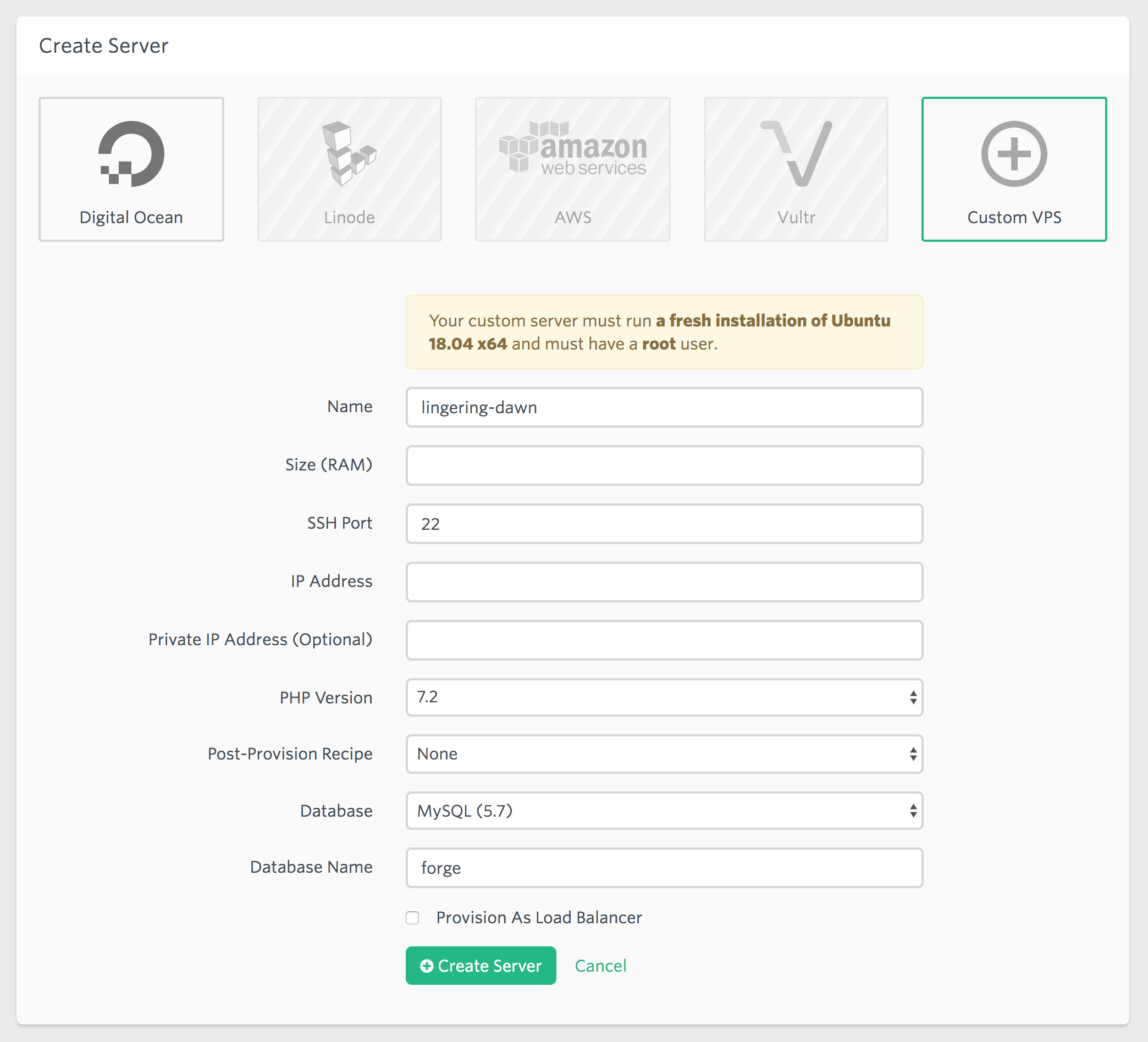
<p>Managing a custom VPS with Laravel Forge is actually very simple. At the time of writing Forge needs a fresh installation of Ubuntu 18.04 x64 and a root user to make its magic happen. To setup the server I did the following steps.</p>
<ol>
<li>Install a fresh <a href="https://www.ubuntu.com/download/server">Ubuntu 18.04 x64</a> on a server</li>
<li>Enable the root user by setting its password with <code>sudo passwd</code></li>
<li>Setup a &quot;Custom VPS&quot; in Forge and enter the server's data</li>
<li>Change to root user with <code>sudo su</code> and <code>cd</code> to root's home directory</li>
<li>Execute the install script Forge provides after creating the server and <code>logout</code></li>
<li>Add your SSH key via Forge so you can connect to the server again (Forge disables SSH password authentication by default)</li>
<li>Connect to your server with <code>ssh forge@&lt;server-ip&gt;</code></li>
<li>Disable the root user again by unsetting its password <code>sudo passwd -dl root</code></li>
<li>Remove the user you've created during the Ubuntu installation with <code>sudo deluser --remove-home &lt;user&gt;</code>, use the forge user instead</li>
<li>Have fun managing your server with Laravel Forge!</li>
</ol>
<p>I hope this post was helpful, let me know what you think about it :)</p>]]>
            </summary>
            <updated>2018-07-13T13:15:23+00:00</updated>
        </entry>
            <entry>
            <title><![CDATA[Using ESLint with Vue.js and Laravel Mix]]></title>
            <link rel="alternate" href="https://simonkollross.de/posts/using-eslint-with-vuejs-and-laravel-mix" />
            <id>https://simonkollross.de/7</id>
            <author>
                <name> <![CDATA[Simon Kollross]]></name>
            </author>
            <summary type="html">
                <![CDATA[<p>Recently I wanted to configure ESLint for one of my projects to ensure consistent formatting and coding standards. Since Laravel Mix doesn't include ESLint configured out of the box I've decided to write a short post about its setup.</p>
<h2>Setup ESLint</h2>
<p>At first you have to add ESLint to your project. I always try to install tools per project. Otherwise I feel like cluttering my system and after a while I'm struggling with version conflicts.</p>
<pre><code class="language-bash">$ npm install eslint --save-dev</code></pre>
<p>Next you have to setup a configuration file. I selected the <a href="https://standardjs.com/">standard</a> coding style and the JavaScript configuration format, but feel free to select according to your personal preferences.</p>
<pre><code class="language-bash">$ ./node_modules/.bin/eslint --init</code></pre>
<p>After that you'll find a file called <code>.eslint.js</code> in your project root with the following contents.</p>
<pre><code class="language-javascript">module.exports = {
  "extends": [
    "standard"
  ]
}</code></pre>
<h2>Setup eslint-plugin-vue</h2>
<p>Since ESLint can't lint <code>.vue</code> files natively you have to install the <a href="https://github.com/vuejs/eslint-plugin-vue">eslint-plugin-vue</a> as well.</p>
<pre><code class="language-bash">$ npm install eslint-plugin-vue --save-dev</code></pre>
<p>To enable it, add a line to the <code>extends</code> array of the <code>.eslint.js</code> file. Pick a <a href="https://github.com/vuejs/eslint-plugin-vue#bulb-rules">rule set</a> depending on how strict the linter should be.</p>
<pre><code class="language-javascript">module.exports = {
  "extends": [
    "standard",
    "plugin:vue/recommended"
  ]
}</code></pre>
<h2>Run the linter</h2>
<p>Run the linter on all <code>.js</code> files in every subdirectory.</p>
<pre><code class="language-bash">$ ./node_modules/.bin/eslint ./path/to/files/**/*.js</code></pre>
<p>Run the linter on all <code>.vue</code> files in every subdirectory.</p>
<pre><code class="language-bash">$ ./node_modules/.bin/eslint ./path/to/files/**/*.vue</code></pre>
<p>To make use of the automatic fixes for common coding style issues, just append <code>--fix</code> to the command and most of the problems are solved automatically.</p>
<h2>Integration with Laravel Mix</h2>
<p>If you're using Laravel Mix you can add <code>eslint-loader</code> to the webpack configuration. It runs every time you save a file while <code>npm run watch</code> is running.</p>
<pre><code class="language-bash">$ npm install eslint-loader --save-dev</code></pre>
<p>Next add the following to <code>webpack.mix.js</code> and customize the settings as needed.</p>
<pre><code class="language-javascript">mix.webpackConfig({
  module: {
    rules: [
      {
        enforce: 'pre',
        test: /\.(js|vue)$/,
        loader: 'eslint-loader',
        exclude: /node_modules/
      }
    ]
  }
})</code></pre>
<h2>Integration with Sublime Text</h2>
<p>Of course there is a plugin for Sublime Text. Install <code>SublimeLinter-eslint</code> via package control and add the following lines to the SublimeLinter settings (Sublime Text → Preferences → Package Settings → SublimeLinter → Settings) to enable linting of <code>.js</code> as well as <code>.vue</code> files.</p>
<pre><code class="language-json">{
  "linters": {
    "eslint": {
      "selector": "text.html.vue, source.js - meta.attribute-with-value"
    }
  }
}</code></pre>
<p>As soon as you open a <code>.js</code> or <code>.vue</code> file you see the coding style issues being highlighted.</p>
<h2>Additional configuration</h2>
<h3>Enable ES2017 features</h3>
<p>If you're using next generation JavaScript features like async/await, ESLint will show an error by default until you enable them.</p>
<pre><code class="language-javascript">module.exports = {
  // ...
  "parserOptions": {
    "ecmaVersion": 2017
  }
}</code></pre>
<h3>Ignore globals</h3>
<p>The linter will warn you if you're using variables which are not defined in the same file. Declare those variables of global scope in <code>globals</code>. <code>true</code> allows the value to be overwritten, <code>false</code> disallows overwriting later in your code.</p>
<pre><code class="language-javascript">module.exports = {
  // ...
  "globals": {
    "Foo": false
  }
}</code></pre>
<h3>Customize rules</h3>
<p>Maybe you don't like some rules or you want to add another one. Just have a look at the <a href="https://eslint.org/docs/rules/">available rules</a> or add some of the uncategorized rules of the <a href="https://github.com/vuejs/eslint-plugin-vue#bulb-rules">eslint-plugin-vue</a> to the <code>rules</code> array.</p>
<pre><code class="language-javascript">module.exports = {
  // ...
  "rules": {
    "object-curly-spacing": ["error", "always"],
    "comma-dangle": ["error", "always-multiline"],
    "vue/html-closing-bracket-newline": "error",
    "vue/html-closing-bracket-spacing": "error",
    "vue/prop-name-casing": "error",
    "vue/max-attributes-per-line": "off"
  }
}</code></pre>
<h2>Conclusion</h2>
<p>I hope this post helps you setting up ESLint for your projects. Make use of automatic style and quality control to prevent coding errors in your apps.</p>]]>
            </summary>
            <updated>2019-04-13T08:56:35+00:00</updated>
        </entry>
            <entry>
            <title><![CDATA[Vue.js: Using v-model with objects for custom components]]></title>
            <link rel="alternate" href="https://simonkollross.de/posts/vuejs-using-v-model-with-objects-for-custom-components" />
            <id>https://simonkollross.de/6</id>
            <author>
                <name> <![CDATA[Simon Kollross]]></name>
            </author>
            <summary type="html">
                <![CDATA[<p>Components are the most powerful feature of Vue.js. They allow you to structure an app as small, reusable units which you can use again to compose new features.</p>
<p>While building SimpleSell, I needed custom components that bundle a bunch of input fields. They should behave like reusable input controls, while their state is provided by an object.</p>
<h2>Basics of <code>v-model</code></h2>
<p>Of course you know <code>v-model</code>, the attribute which makes most of your input elements working. But did you know that you can use <code>v-model</code> as an interface for own components, too?</p>
<p>For a better understanding let's have a look at some basics.</p>
<pre><code class="language-html">&lt;input type="text" v-model="value"&gt;</code></pre>
<p><code>v-model</code> is nothing more than syntactical sugar for the following.</p>
<pre><code class="language-html">&lt;input type="text" :value="value" @input="e =&gt; value = e.target.value"&gt;</code></pre>
<p>First we have the <code>:value</code> binding. It supplies the value of the input field. Second there is the <code>@input</code> event. As soon as there is an input event fired, we update the model's data property <code>value</code> with the current value of the input element. You also can use the abbreviation: <code>@input="value = $event.target.value"</code>.</p>
<h2>Wrapping an input field in a custom component</h2>
<p>So let's create a small <code>CreateCustomer.vue</code> component which is nothing more than a wrapped input element.</p>
<pre><code class="language-html">&lt;template&gt;
  &lt;div&gt;
    &lt;label&gt;Name&lt;/label&gt;
    &lt;input type="text" :value="value" @input="$emit('input', $event.target.value)"&gt;
  &lt;/div&gt;
&lt;/template&gt;
&lt;script&gt;
export default {
  props: ['value'],
}
&lt;/script&gt;</code></pre>
<p>We bind the value that we get from the parent component to the text input and for <code>@input</code> we emit an input event with the field's current value to the parent. The next snippet shows the usage of the component.</p>
<pre><code class="language-html">&lt;template&gt;
  &lt;CreateCustomer v-model="name"&gt;&lt;/CreateCustomer&gt;
&lt;/template&gt;
&lt;script&gt;
import CreateCustomer from './CreateCustomer'   

export default {
  components: { CreateCustomer },
  data() {
    return {
      name: 'John Doe',
    }
  },
}
&lt;/script&gt;</code></pre>
<h2>Using an object with <code>v-model</code></h2>
<p>As soon as we add more input elements and want to use an object as value for <code>v-model</code>, things get a bit more complicated. I found <a href="https://github.com/vuejs/vue/issues/4373#issuecomment-279826554">this issue on GitHub</a> where Evan You from Vue.js provides an example how <code>v-model</code> is supposed to work with objects.</p>
<p><strong>Basically every data update of the component has to <code>$emit</code> a completely new instance of the object which then replaces the object instance stored in the parent's data.</strong> Otherwise you will get pretty strange and hard to debug behavior (e.g. watchers are not working properly) because objects are passed by reference in JavaScipt.</p>
<p>At first glance this sounds very complicated but actually it isn't. You have to create a (deep) clone of the object, change values only on the clone and <code>$emit</code> that object.</p>
<p>Let's extend our <code>CreateCustomer</code> component with a second input, a select for the contact type.</p>
<pre><code class="language-html">&lt;template&gt;
  &lt;div&gt;
    &lt;div&gt;
      &lt;label&gt;Name&lt;/label&gt;
      &lt;input type="text" :value="value.name" @input="update('name', $event.target.value)"&gt;
    &lt;/div&gt;
    &lt;div&gt;
      &lt;label&gt;Type&lt;/label&gt;
      &lt;select :value="value.type" @input="update('type', $event.target.value)"&gt;
        &lt;option value="Person"&gt;Person&lt;/option&gt;
        &lt;option value="Company"&gt;Company&lt;/option&gt;
      &lt;/select&gt;
    &lt;/div&gt;
  &lt;/div&gt;
&lt;/template&gt;
&lt;script&gt;
export default {
  props: ['value'],
  methods: {
    update(key, value) {
      this.$emit('input', { ...this.value, [key]: value })
    },
  },
}
&lt;/script&gt;</code></pre>
<p>Now that we have two fields we use an object as argument for <code>v-model</code> for the first time.</p>
<pre><code class="language-html">&lt;CreateCustomer v-model="{ name: 'John Doe', type: 'Person' }"&gt;&lt;/CreateCustomer&gt;</code></pre>
<p>For the <code>:value</code> bindings just use the object's properties. For the <code>@input</code> I created a method which emits the input event with a shallow clone of the object and sets the new value for the given key. Remember you can use object destructuring for shallow cloning of objects since ES6.</p>
<h2>Using <code>v-model</code> with <code>null</code></h2>
<p>Maybe there is the case where we default the <code>v-model</code> value with <code>null</code> in our parent component because we don't know if our <code>CreateCustomer</code> form is actually used. If we pass <code>null</code> we get an error because we can't access object properties on <code>null</code>. In addition the consumer shouldn't know that the component only works if at least an empty object is passed to <code>v-model</code>.</p>
<p>Second, we need a default value for <code>type</code>. Otherwise the select shows an invalid empty option at the top.</p>
<p>I struggled a lot with this problem and thankfully Adam Wathan helped me out. (Check out his upcoming <a href="https://adamwathan.me/advanced-vue-component-design/">Advanced Vue Component Design</a> course, I highly recommend it!)</p>
<p>He suggested to use computed properties. So let's refactor our component again and add a computed property <code>local</code> which returns the value if there is one, otherwise an object with appropriate defaults.</p>
<pre><code class="language-html">&lt;template&gt;
  &lt;div&gt;
    &lt;div&gt;
      &lt;label&gt;Name&lt;/label&gt;
      &lt;input type="text" :value="local.name" @input="update('name', $event.target.value)"&gt;
    &lt;/div&gt;
    &lt;div&gt;
      &lt;label&gt;Type&lt;/label&gt;
      &lt;select :value="local.type" @input="update('type', $event.target.value)"&gt;
        &lt;option value="Person"&gt;Person&lt;/option&gt;
        &lt;option value="Company"&gt;Company&lt;/option&gt;
      &lt;/select&gt;
    &lt;/div&gt;
  &lt;/div&gt;
&lt;/template&gt;
&lt;script&gt;
export default {
  props: ['value'],
  computed: {
    local() {
      return this.value ? this.value : { type: 'Person' }
    },
  },
  methods: {
    update(key, value) {
      this.$emit('input', { ...this.local, [key]: value })
    },
  },
}
&lt;/script&gt;</code></pre>
<p>Be aware that we only use <code>this.value</code> in our computed property <code>local</code>. Everywhere else we use <code>this.local</code> instead of <code>this.value</code>. So if we're getting a <code>null</code> value, we're working with our defaults and thus prevent weird errors.</p>
<h2>Using a nested object with <code>v-model</code></h2>
<p>Let's take it a step further. Suppose we have a data model like the following for our <code>CreateCustomer</code> component.</p>
<pre><code class="language-javascript">{
  name: 'John Doe',
  type: 'Person',
  address: {
    street: 'Example Street 42',
    zip: '12345',
    city: 'Example City'
  }
}</code></pre>
<p>We added a nested object <code>address</code>. Basically there are two options to extend our component:</p>
<ol>
<li>Create a custom component <code>CustomerAddress</code> and use the patterns shown above. Then there would be one responsible component per level of nesting in the data model (which is a good recommendation anyway).</li>
<li>Embed it into our component.</li>
</ol>
<p>We take the second, more complex approach so I can give you deeper insight into using nested objects with <code>v-model</code>.</p>
<p>To keep things simple, I removed some fields and only add a new input for <code>address.street</code>.</p>
<pre><code class="language-html">&lt;template&gt;
  &lt;div&gt;
    &lt;div&gt;
      &lt;label&gt;Name&lt;/label&gt;
      &lt;input type="text" :value="local.name" @input="update('name', $event.target.value)"&gt;
    &lt;/div&gt;
    &lt;!-- ... --&gt;
    &lt;div&gt;
      &lt;label&gt;Street&lt;/label&gt;
      &lt;input type="text" :value="local.address.street" @input="update('address.street', $event.target.value)"&gt;
    &lt;/div&gt;
    &lt;!-- inputs for zip and city work the same way --&gt;
  &lt;/div&gt;
&lt;/template&gt;
&lt;script&gt;
import { cloneDeep, tap, set } from 'lodash'

export default {
  props: ['value'],
  computed: {
    local() {
      return this.value ? this.value : { type: 'Person', address: {} }
    },
  },
  methods: {
    update(key, value) {
      this.$emit('input', tap(cloneDeep(this.local), v =&gt; set(v, key, value)))
    },
  },
}
&lt;/script&gt;</code></pre>
<p>We're dealing with a nested object, so we bind <code>local.address.street</code> as our input's value. Remember to add <code>address: {}</code> to the <code>local</code> computed property to prevent null pointers.</p>
<p>Since there is no native JavaScript function for deep cloning an object I've imported some functions from <a href="https://lodash.com/">Lodash</a>.</p>
<ul>
<li><code>cloneDeep(value)</code>: Creates a deep clone of the <code>value</code>.</li>
<li><code>tap(value, callback)</code>: Returns <code>value</code> after passing it to <code>callback</code>. Used to create a functional expressive one-liner function ;-)</li>
<li><code>set(object, path, value)</code>: Sets a nested <code>value</code> on an <code>object</code>, specified by a <code>path</code> in dot notation, e.g. <code>set({}, 'address.street', 'Example Street 42')</code> yields <code>{ address: { street: 'Example Street 42' } }</code>.</li>
</ul>
<p>The <code>update</code> method accepts a property path as <code>key</code>, creates a deep clone of our <code>local</code> computed value and sets the new value at the right property path. Setting nested values becomes as simple as <code>@input="update('address.street', $event.target.value)"</code>.</p>
<h2>Working with nested arrays</h2>
<p>Let's consider we want to store a list of contact items for every customer with the option to add and delete them.</p>
<pre><code class="language-javascript">{
  name: 'John Doe',
  type: 'Person',
  address: {
    street: 'Example Street 42',
    zip: '12345',
    city: 'Example City'
  },
  contacts: [
    { type: 'Email', value: 'john@example.com' },
    { type: 'Phone' value: '+1234567890' }
  ]
}</code></pre>
<p>So we extend our component for a last time.</p>
<pre><code class="language-html">&lt;template&gt;
  &lt;div&gt;
    &lt;!-- ... --&gt;
    &lt;div&gt;
      &lt;div&gt;
        &lt;label&gt;Type&lt;/label&gt;
        &lt;select v-model="newContactType"&gt;
          &lt;option value="Phone"&gt;Phone&lt;/option&gt;
          &lt;option value="Email"&gt;Email&lt;/option&gt;
        &lt;/select&gt;
      &lt;/div&gt;
      &lt;div&gt;
        &lt;label&gt;Value&lt;/label&gt;
        &lt;input type="text" v-model="newContactValue"&gt;
      &lt;/div&gt;
      &lt;button type="button" @click="addContact"&gt;Add&lt;/button&gt;
    &lt;/div&gt;
    &lt;div v-for="(contact, i) in local.contacts"&gt;
      {{ contact.type }} {{ contact.value }}
      &lt;button type="button" @click="removeContact(i)"&gt;Remove&lt;/button&gt;
    &lt;/div&gt;
  &lt;/div&gt;
&lt;/template&gt;
&lt;script&gt;
import { cloneDeep, tap, set } from 'lodash'

export default {
  props: ['value'],
  data() {
    return {
      newContactType: 'Email',
      newContactValue: null,
    }
  },
  computed: {
    local() {
      return this.value ? this.value : { type: 'Person', address: {}, contacts: [] }
    },
  },
  methods: {
    // ...
    addContact() {
      this.$emit('input', tap(cloneDeep(this.customer), v =&gt; v.contacts.push({ 
        type: this.newContactType,
        value: this.newContactValue,
      })))
    },
    removeContact(i) {
      this.$emit('input', tap(cloneDeep(this.customer), v =&gt; v.contacts.splice(i, 1)))
    },
  },
}
&lt;/script&gt;</code></pre>
<p>For the logic needed to add a new contact item, <code>v-model</code> is used directly because it's only about local state in our component that shouldn't be propagated to the parent. Remember to add <code>contacts: []</code> to the <code>local</code> computed property to use an empty array as default. Only if the add or delete button is clicked, a new input event is emitted with a deep clone of the object including the array's changes.</p>
<h2><code>$emit</code> initial state from the <code>created</code> hook</h2>
<p>Of course you can use the <code>update</code> method in the <code>created</code> hook, too. Use it to set component's defaults at its instantiation and propagate them to the parent instantly. Be aware that you should only use <strong>one</strong> <code>update</code> or <code>$emit</code> and set the initial state <strong>at once</strong> to prevent unexpected executions of watchers and timing issues.</p>
<pre><code class="language-html">&lt;script&gt;
export default {
  created() {
    this.$emit('input', tap(cloneDeep(this.local), v =&gt; {
      v.type = 'Company'
      v.address.city = 'Example City'
      v.contacts.push({ type: 'Email' })
    }))
  },
}
&lt;/script&gt;</code></pre>
<h2>Conclusion</h2>
<p>Congratulations, if you've read this post until here! This post got a lot longer than I've expected :-)</p>
<p>I've explained a lot of concepts in this post. Of course you should not use those patterns for every component you build. Sometimes it's better to just decompose complex components into smaller ones which are easier to work with and to reason about.</p>
<p>But if you need custom input controls with a simple <code>v-model</code> interface in different parts of your app, consider these ideas and tell me how they're working out for you, e.g. on <a href="https://twitter.com/skollro">Twitter</a>.</p>]]>
            </summary>
            <updated>2019-04-13T08:56:06+00:00</updated>
        </entry>
            <entry>
            <title><![CDATA[Working with Laravel collections]]></title>
            <link rel="alternate" href="https://simonkollross.de/posts/working-with-laravel-collections" />
            <id>https://simonkollross.de/5</id>
            <author>
                <name> <![CDATA[Simon Kollross]]></name>
            </author>
            <summary type="html">
                <![CDATA[<p>I like Laravel collections very much and I favour a functional approach towards solving list problems. So I’d like to start a series where I share tips about working with collections on upcoming problems in my current projects. Lately I wanted to transform the following structure</p>
<pre><code class="language-php">$vendors = [
    'FruitHouse' =&gt; ['Apples', 'Bananas', 'Cherries'],
    'EatFresh' =&gt; ['Apples', 'Bananas', 'Berries']
];</code></pre>
<p>into this “inverted” one:</p>
<pre><code class="language-php">$vendorsByFruits = [
    'Apples' =&gt; ['FruitHouse', 'EatFresh'], 
    'Bananas' =&gt; ['FruitHouse', 'EatFresh'], 
    'Cherries' =&gt; ['FruitHouse'], 
    'Berries' =&gt; ['EatFresh']
];</code></pre>
<p>My first approach was very traditional using a nested foreach loop:</p>
<pre><code class="language-php">$vendorsByFruits = [];
foreach ($vendors as $vendor =&gt; $fruits) {
    foreach ($fruits as $fruit) {
        $vendorsByFruits[$fruit][] = $vendor;
    }
}</code></pre>
<p>But I wanted to have this as a single collection transformation. So finally I came up with this solution:</p>
<pre><code class="language-php">$vendorsByFruits = collect($vendors)-&gt;map(function ($fruits, $vendor) {
    return ['vendor' =&gt; $vendor, 'fruits' =&gt; $fruits];
})-&gt;groupBy('fruits')-&gt;map(function ($group) {
    return $group-&gt;pluck('vendor');
});</code></pre>
<p>I hope you’ll find this tip useful!</p>]]>
            </summary>
            <updated>2018-04-22T13:40:12+00:00</updated>
        </entry>
            <entry>
            <title><![CDATA[Accessing window.App with a Vue.js mixin]]></title>
            <link rel="alternate" href="https://simonkollross.de/posts/accessing-windowapp-with-a-viewjs-mixin" />
            <id>https://simonkollross.de/4</id>
            <author>
                <name> <![CDATA[Simon Kollross]]></name>
            </author>
            <summary type="html">
                <![CDATA[<p>Nearly every app which uses Laravel has to export some vars from PHP to use them in JavaScript, e. g. the <code>appUrl</code> or the <code>csrfToken</code>.</p>
<p>The common pattern to accomplish that is by adding a <code>&lt;script&gt;</code> tag to the  <code>&lt;head&gt;</code> of the main layout <code>app.blade.php</code> and generate some JavaScript with Blade or pure PHP. If you don’t want to write it manually, you can use the excellent package <a href="https://github.com/spatie/laravel-blade-javascript">spatie/laravel-blade-javascript</a> that provides you a Blade directive to export variables.</p>
<p>But let’s just use this simple example with some blade expressions:</p>
<pre><code class="language-html">&lt;head&gt;
    &lt;title&gt;Laravel&lt;/title&gt;
    &lt;script&gt;
        window.App = {
            csrfToken: '{{ csrf_token() }}',
            appUrl: '{{ config('app.url') }}'
        };
    &lt;/script&gt;
&lt;/head&gt;</code></pre>
<p>When we use Vue in our app we often want to access these exported vars from within a custom component, e. g. when we’re creating forms. We are in a different scope and so we can’t reach <code>window.App</code> directly from our template with an expression.</p>
<p>The easy way to deal with it is to export an additional property <code>globals</code> from the <code>data()</code> function of the component:  <code>globals: window.App</code>. But this is becoming awkward when there are a lot of components.</p>
<h2>A Vue mixin to the rescue!</h2>
<p>With a Vue mixin you can extend Vue instances with custom functionality with an opt-in behavior. Just create a file  <code>resources/assets/js/mixins.js</code> and put in the following:</p>
<pre><code class="language-javascript">export const globals = {
    data() {
        return {
            globals: window.App
        }
    }
}</code></pre>
<p>It’s simply a partial component. And you can put in nearly everything you can put in a real component. Other components which use the mixin have to explicitly specify it and then it’s merged in your actual instance. Every component that uses the mixin has a  <code>globals</code> variable now available as a data property.</p>
<pre><code class="language-html">&lt;template&gt;
    &lt;span&gt;{{global.appUrl}}&lt;/span&gt;
&lt;/template&gt;
&lt;script&gt;
import {globals} from "../mixins"
export default {
    mixins: [globals],
    data() {
        return {
            some: 'data'
        }
    }
}
&lt;/script&gt;</code></pre>
<p>A big advantage of the mixin solution is that you don’t have to include your mixin in every Vue instance you create (compared to <code>Vue.extend()</code>), but just where you need it. Further it introduces some kind of better structuring, because changes to the global vars are made in one place now.</p>
<p>Have fun with cleaning up your Vue.js components!</p>]]>
            </summary>
            <updated>2019-04-13T08:55:15+00:00</updated>
        </entry>
            <entry>
            <title><![CDATA[A repeat collection macro]]></title>
            <link rel="alternate" href="https://simonkollross.de/posts/a-repeat-collection-macro" />
            <id>https://simonkollross.de/3</id>
            <author>
                <name> <![CDATA[Simon Kollross]]></name>
            </author>
            <summary type="html">
                <![CDATA[<p>A short time ago I had to add a placeholder item to a Laravel collection several times. I created a repeat macro to achieve this without breaking up the collection pipeline flow.</p>
<pre><code class="language-php">Collection::macro('repeat', function ($times, callable $callback) {
    for ($i = 0; $i &lt; $times; $i++) {
        $callback($this);
    }
    return $this;
});</code></pre>
<p>This was the first version and it allows you to write things like this:</p>
<pre><code class="language-php">collect([1, 2, 3])-&gt;repeat(3, function ($collection) {
    $collection-&gt;prepend(null);
});</code></pre>
<p>This adds <code>null</code> 3 times to the head of the collection:  <code>[null, null, null, 1, 2, 3]</code>. This implementation was sufficient for my needs, but I wanted to generalize it a bit to allow more flexibility.</p>
<pre><code class="language-php">Collection::macro('repeat', function ($times, callable $callback) {
    if (is_callable($times)) {
        $i = 0;
        while ($times($this)) {
            $callback($this, $i);
            $i++;
        }
        return $this;
   }
    for ($i = 0; $i &lt; $times; $i++) {
        $callback($this, $i);
    }
    return $this;
});</code></pre>
<p>Now <code>$times</code> can be a callback which should return a boolean value. The abort condition can be specified based on the collection’s state. Every time  <code>$callback</code> is executed, <code>$i</code> is passed to have access to the current iteration index.</p>
<pre><code class="language-php">collect([1, 2, 3])-&gt;repeat(function ($collection) {
    return $collection-&gt;count() &lt; 10;
}, function ($collection, $i) {
    $collection-&gt;push($i);
});</code></pre>
<p>So as long as the collection contains less than 10 items, new items are pushed to the collection.</p>
<p>You can use the <code>pipe()</code> collection method for this task, too. But I wanted to have a short and elegant way to solve this problem without having to write a loop manually. If you like programming with collection pipelines, I hope you’ll enjoy this macro.</p>]]>
            </summary>
            <updated>2018-04-22T13:39:55+00:00</updated>
        </entry>
            <entry>
            <title><![CDATA[Packaging a Java app for Mac with Maven]]></title>
            <link rel="alternate" href="https://simonkollross.de/posts/packaging-a-java-app-for-mac-with-maven" />
            <id>https://simonkollross.de/2</id>
            <author>
                <name> <![CDATA[Simon Kollross]]></name>
            </author>
            <summary type="html">
                <![CDATA[<p>Recently I had the task to prepare a Java app for deployment on MacOS. The project setup was based on Maven and so the packaging step should be integrated in the Maven build process. There were only old and outdated tutorials with lots of manual work out there. Luckily I found a Maven plugin on GitHub, which simplifies this task a lot: <a href="https://github.com/federkasten/appbundle-maven-plugin">https://github.com/federkasten/appbundle-maven-plugin</a>. It supports a lot of configuration options for packaging a Java app and creates a DMG for you. But be careful, the creation of a DMG only works on a Mac.</p>
<h2>Basic usage</h2>
<p>Insert the following into your build plugins section, customize your main class name and you’re good to go.</p>
<pre><code class="language-xml">&lt;plugin&gt;
    &lt;groupId&gt;sh.tak.appbundler&lt;/groupId&gt;
    &lt;artifactId&gt;appbundle-maven-plugin&lt;/artifactId&gt;
    &lt;version&gt;1.2.0&lt;/version&gt;
    &lt;configuration&gt;
        &lt;mainClass&gt;HelloWorld&lt;/mainClass&gt;
        &lt;generateDiskImageFile&gt;true&lt;/generateDiskImageFile&gt;
    &lt;/configuration&gt;
    &lt;executions&gt;
        &lt;execution&gt;
            &lt;phase&gt;package&lt;/phase&gt;
            &lt;goals&gt;
                &lt;goal&gt;bundle&lt;/goal&gt;
            &lt;/goals&gt;
        &lt;/execution&gt;
    &lt;/executions&gt;
&lt;/plugin&gt;</code></pre>
<p>Run <code>clean package appbundle:bundle</code> and after the build finishes you find a DMG in the <code>target</code> folder.</p>
<h2>Set icon file and disk name</h2>
<p>To set the icon file and the name of the DMG, add this to the  <code>&lt;configuration&gt;</code> section:</p>
<pre><code class="language-xml">&lt;bundleName&gt;Hello World&lt;/bundleName&gt;
&lt;iconFile&gt;HelloWorld.icns&lt;/iconFile&gt;</code></pre>
<p>The icon file requires the .icns format. I used <a href="https://iconverticons.com/online/">https://iconverticons.com/online/</a> to generate my icon. You have to add it to <code>src/main/resources</code> because the specified <code>&lt;iconFile&gt;</code> is loaded from this path.</p>
<p><strong>Hint:</strong> The <code>&lt;bundleName&gt;</code> is the name of the disk and not  the app name! To set an app name you must add <code>&lt;finalName&gt;AppName&lt;/finalName&gt;</code> to your <code>&lt;build&gt;</code> section.</p>
<h2>Deliver additional files</h2>
<p>If you want to deliver additional files with your app which are not packaged into your JAR, add the following to the <code>&lt;configuration&gt;</code> section:</p>
<pre><code class="language-xml">&lt;workingDirectory&gt;$APP_ROOT/../&lt;/workingDirectory&gt;
&lt;additionalResources&gt;
    &lt;fileSet&gt;
        &lt;directory&gt;${project.basedir}&lt;/directory&gt;
        &lt;includes&gt;
            &lt;include&gt;*.txt&lt;/include&gt;
        &lt;/includes&gt;
    &lt;/fileSet&gt;
&lt;/additionalResources&gt;</code></pre>
<p>This snippet selects all .txt files in <code>${project.basedir}</code> and adds them to the DMG. <code>&lt;workingDirectory&gt;</code> adjusts the working directory of your Java app so you can access the delivered files from within your application as if your app would be a normal JAR without changing file paths in your Java code.</p>
<h2>Deliver additional classpath resources</h2>
<p>You can deliver classpath ressources for your app, too. These can be e. g. external libs, which are not included in your JAR. Simply add these resources to a folder in your project directory, e. g. <code>dist/libs</code> and include the following:</p>
<pre><code class="language-xml">&lt;additionalClasspath&gt;:$APP_ROOT/../libs/&lt;/additionalClasspath&gt;
&lt;additionalResources&gt;
    &lt;fileSet&gt;
        &lt;directory&gt;${project.basedir}/dist&lt;/directory&gt;
    &lt;/fileSet&gt;
&lt;/additionalResources&gt;</code></pre>
<p>Via <code>&lt;additionalClasspath&gt;</code> you can add classpath resources for your app. <strong>Hint:</strong> Classpathes are separated by a <code>:</code> at the beginning of each referenced directory or JAR file!</p>
<p>I hope you can use some of my code examples for delivering your next Java app for Mac!</p>]]>
            </summary>
            <updated>2018-04-22T13:39:49+00:00</updated>
        </entry>
            <entry>
            <title><![CDATA[A join collection macro]]></title>
            <link rel="alternate" href="https://simonkollross.de/posts/a-join-collection-macro" />
            <id>https://simonkollross.de/1</id>
            <author>
                <name> <![CDATA[Simon Kollross]]></name>
            </author>
            <summary type="html">
                <![CDATA[<p>Today I needed to join two Laravel collections like a SQL join would do. The collection zip function was not what I needed, because it joins only on indexes, not on values. My macro should join two collections based on a custom join condition given by a callback.</p>
<pre><code class="language-php">Collection::macro('join', function ($items, callable $callback) {
    return $this-&gt;flatMap(function ($value) use ($items, $callback) {
        return $items-&gt;filter(function ($item) use ($value, $callback) {
            return $callback($value, $item);
        })-&gt;map(function ($item) use ($value) {
            return new Collection([$value, $item]);
        });
    });
});</code></pre>
<p>This macro function takes the actual collection, which is the base for the join and another collection to join with. The filter function filters the second collection for items, which satisfy the given join condition callback. The filtered collection items are mapped to a new collection, which contains the joined pair. With the outer map function the results are collected and at last flattened one level.</p>
<pre><code class="language-php">$first = collect([0, 1, 2]);
$second = collect([0, 0, 1]);
$result = $first-&gt;join($second, function ($a, $b) {
    return $a == $b;
});
dd($result);</code></pre>
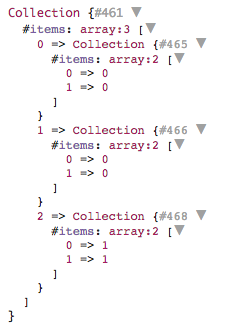
<p>And here is the result:</p>
<p><img src="https://simonkollross.de/storage/uploads/5keUlsBTGiYiwW8A3UeFhFb7YDR6fiPBigkC5srQ.png" alt="Joined collection" /></p>
<p>This is a very clean and reusable functional solution in comparison to writing an imperative nested loop join over and over again from scratch.</p>]]>
            </summary>
            <updated>2018-04-22T13:39:41+00:00</updated>
        </entry>
    </feed>